




Up to 10 showcases. Add your own sections to your profile, each with its own title.
Your picks, your order. Each showcase holds up to 32 of your images, models or articles, in the order you choose.
Add from the menu. Open the menu on one of your images, models or articles and choose Add to Showcase to drop it into a showcase.
Your button. Swap "View all" for a button with your own label, pointing anywhere on Civitai or to your own site.
Works like the rest of your profile. Drag showcases into place or hide them, the same way you arrange your other sections.
Here it is in 30 seconds. (And yes, this video was made with AI.)
A few weeks ago, in her introduction, Ellie mentioned she was working on a facelift for user profiles. Showcase sections are the first piece of it, and the part we heard the most requests for.
Why we're doing this
Until now, your profile showed your most popular models, your most popular articles, and a single Showcase at the top. That works if your best work is also your most downloaded work, and often it isn't.
Showcase sections hand that choice to you, so you can put a set of your favorite images together, pin the guides you're proud of, group your LoRAs by style, or put the thing you just made where people will see it first.
How it works
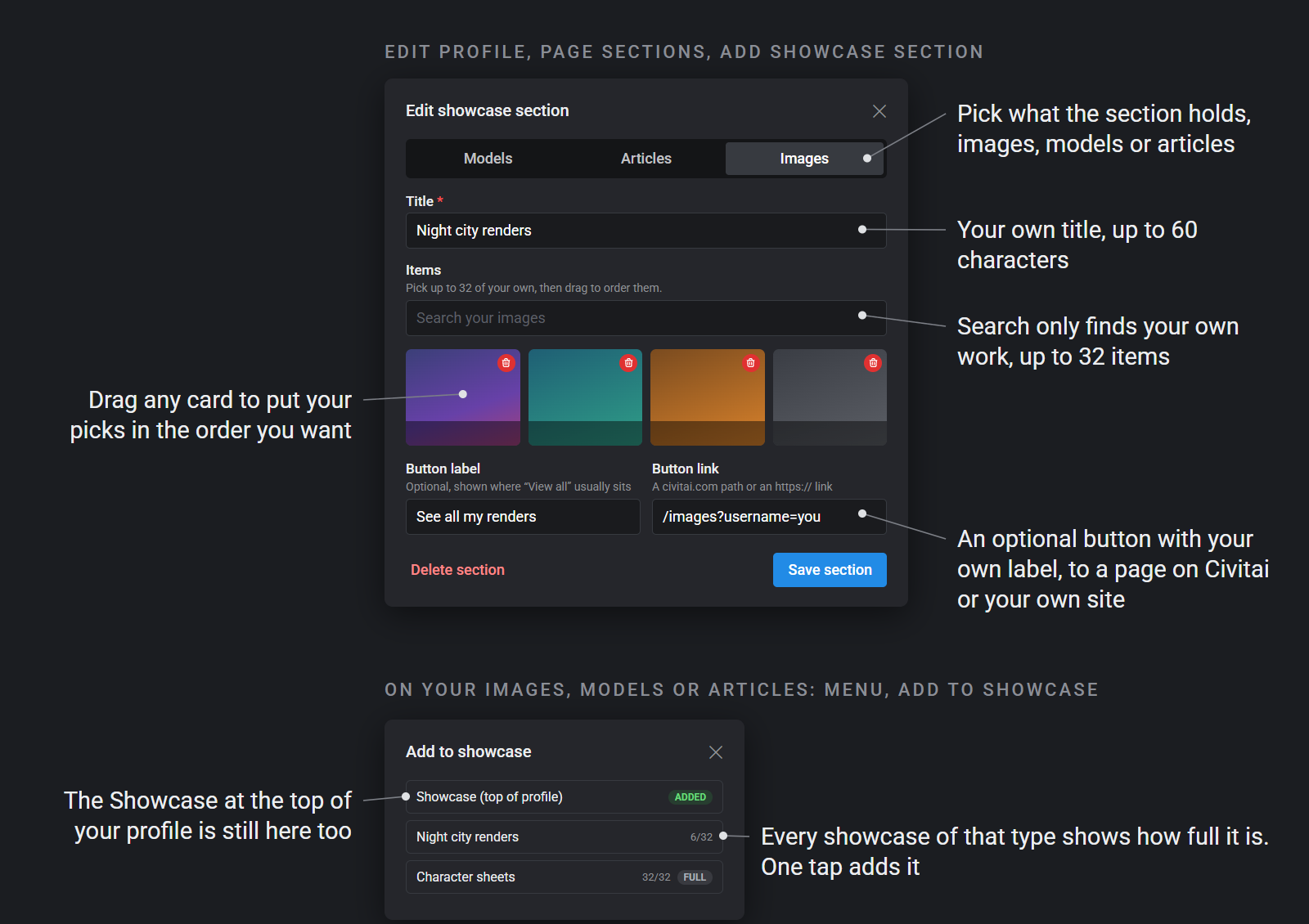
Make a showcase. Open Edit profile, go to Page sections and press Add showcase section. Pick images, models or articles, give it a title and add up to 32 items. The search only returns your own work of that type, so you won't be scrolling through everything on the site.
Add as you go. You don't have to build a showcase all at once. On any of your images, models or published articles, open the menu and choose Add to Showcase. You'll see each of your showcases of that type with how full it is (plus the Showcase at the top of your profile, for images and models), and one tap puts it in.
Put them in order. Drag items to reorder them. Drag the showcase itself to move it up or down your profile, or switch it off to hide it. It behaves like the sections you already have.
Give it a button. Every showcase can have an optional button where "View all" usually sits. Give it your own label and point it anywhere on Civitai, like a filtered list of your models, or out to your own site with an https link. Links that leave Civitai show the usual heads-up before someone goes.
Here's the editor, with what each part does.
Good to know
Images, models and articles. Each showcase holds one of the three.
Viewers see your order. The automatic sections, like Most popular models, stay wherever you put them.
Empty showcases stay hidden. Anything that's deleted, unpublished or filtered out for a viewer drops out too, the same as it does in the Showcase today.
Your current Showcase stays. Nothing about it changes, and it's still in the Add to Showcase list.
Thank you
Thanks to the testers who tried this early and told us where the picker came up empty. There's more of the profile facelift to come, and we'd love to hear what you'd want to showcase next.
Comments